Playing DOOM in OpenSCAD at 10-20 FPS
DOOM in OpenSCAD at 10-20 FPS - real-time 3D rendering in a parametric CAD tool using the Manifold geometry kernel
Running id Software’s 1993 classic in a CAD program was never supposed to work this well.
Play it now in your browser at doom.mikeayles.com
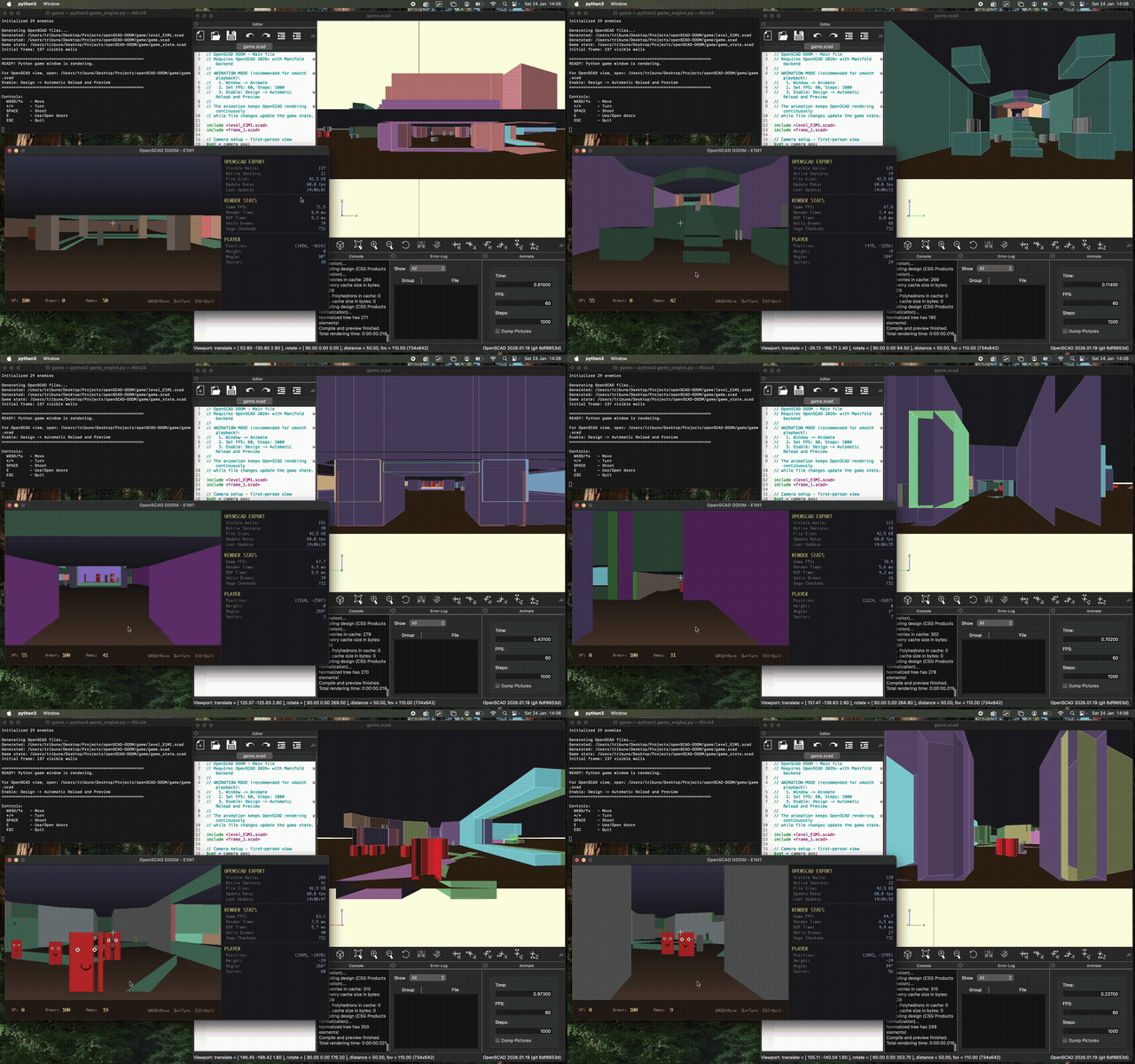
The Quadrilogy of Engineering Tool Abuse
This is the third entry in an increasingly unhinged series of projects that answer the question: “Can I run DOOM on engineering tools that were absolutely not designed for games?” The fourth entry - a browser-based version - is now live.
| Project | Tool Abused | What It's Actually For | FPS |
|---|---|---|---|
| KiDoom | KiCad PCB Editor | Designing circuit boards | 10-25 |
| ScopeDoom | Oscilloscope + Sound Card | Debugging electronics | 4-8 |
| OpenSCAD-DOOM | OpenSCAD | Parametric 3D modeling | 10-20 |
| OpenSCAD-DOOM Web | Browser + Custom SCAD Parser | Showing people demos | 60 |
KiDoom renders walls as copper traces and enemies as QFP-64 chip footprints. ScopeDoom pipes vector coordinates through a headphone jack into an oscilloscope’s X-Y mode. OpenSCAD-DOOM exports geometry to a parametric CAD language designed for mechanical parts. And now OpenSCAD-DOOM Web runs entirely in the browser with a custom SCAD parser.
The first two both hit #1 on Hacker News, so apparently there’s an audience for this sort of thing.
Four professional tools. Four completely inappropriate applications. One demon-infested Mars base.
The Method to the Madness
These projects look like pure silliness, but there’s a reason I keep diving into PCB editors and CAD tools at the API level.
Running DOOM on something is a surprisingly effective way to learn it deeply. You can’t fake real-time rendering. Either you understand the tool well enough to push geometry at 10+ FPS, or you don’t. KiDoom taught me KiCad’s Python scripting API and PCB object model. OpenSCAD-DOOM taught me the WASM rendering pipeline and Manifold backend. Both fed directly into Phaestus, a project I’m working on to generate PCBs, enclosures, and firmware from natural language.
So yes, it’s absurd. But it’s also R&D disguised as entertainment.
The Challenge
OpenSCAD is a programmer’s CAD tool - you write code, it renders 3D models. It’s designed for creating precise mechanical parts, not real-time graphics. The file watcher refreshes at 200ms intervals. There’s no game loop. No input handling. No frame buffer.
Naturally, I had to run DOOM in it.
The Approach
Rather than trying to hack OpenSCAD itself, I built a custom DOOM engine in Python that exports geometry to OpenSCAD in real-time.
The architecture:
┌─────────────┐     ┌─────────────┐     ┌─────────────────────────────┐
│   Input     │────▶│   Python    │────▶│  Dual Renderer              │
│  (pygame)   │     │ Game Engine │     │  ├─ Pygame (real-time)      │
└─────────────┘     └─────────────┘     │  └─ OpenSCAD (file export)  │
                                        └─────────────────────────────┘
What I use from DOOM:
- WAD file parsing (level geometry, BSP trees, thing positions)
- The original map data, texture references, sector heights
What I built from scratch:
- Game loop and input handling
- BSP traversal for visibility culling
- Software renderer (pygame) for real-time preview
- OpenSCAD code generator
- Player movement and collision
- Door system
- Enemy rendering
It’s a fully custom engine that reads DOOM’s data format - not a port of the original code.
The Hacks
Getting acceptable performance required several tricks:
1. Animation Mode Bypass
OpenSCAD’s file watcher has a 200ms debounce timer - it waits for files to stop changing before reloading. This limits you to ~5 FPS.
The hack: OpenSCAD’s Animation mode (Window → Animate) renders continuously at a user-specified framerate, re-evaluating the scene each frame. By setting FPS to 60 and Steps to 1000, I keep OpenSCAD rendering constantly while my file changes update the geometry.
The $t variable cycles 0→1, but I don’t even use it - I just need the continuous render loop.
2. OpenSCAD 2025 with Manifold
This is where I need to credit some earlier work. I first attempted this DOOM project about a month ago, but it was unplayably slow. In the meantime, I was optimizing the OpenSCAD renderer for Phaestus. The enclosure generation stage was taking 2 minutes to render moderately complex designs.
The deep dive into that problem (documented here) revealed the key insight: the npm openscad-wasm package was from 2022 and didn’t include the Manifold geometry kernel. The --enable=manifold flag was being silently ignored. The fix was using the 2025 WASM build from the OpenSCAD Playground with --backend=manifold.
That optimization took Phaestus from 2-minute renders to 2 seconds. Carrying that knowledge back to this project made DOOM actually playable.
For desktop OpenSCAD, enable it: Preferences → Advanced → 3D Rendering → Backend → Manifold
This alone took it from slideshow to playable. It’s still ugly, but it’s fast.
3. Double-Buffered File Writes
Writing to a file while OpenSCAD reads it causes corruption. I use double-buffering:
# Write to back buffer
with open(f"frame_{next_buffer}.scad", 'w') as f:
    f.write(content)
    f.flush()
    os.fsync(f.fileno())  # Force to disk

# Update main file to include the new frame
self._write_main_file(f"frame_{next_buffer}.scad")
The main game.scad just includes the current frame file. I swap which frame file it points to after each write completes.
4. Geometry Optimizations
- Thicker walls (3 units) - reduces z-fighting artifacts
- BSP visibility culling - only export walls the player can see
- Low polygon counts -
$fn = 12for cylinders - No floor/ceiling polygons - just large background planes
The Result
On a MacBook Pro M1:
| Metric | Value |
|---|---|
| OpenSCAD FPS | 10-20 |
| Visible walls | 100-200 |
| File size | ~40KB |
| Latency | <100ms |
It’s genuinely playable. You can walk through E1M1 (and any other DOOM level), open doors, see enemies, and watch it all render in a CAD program.
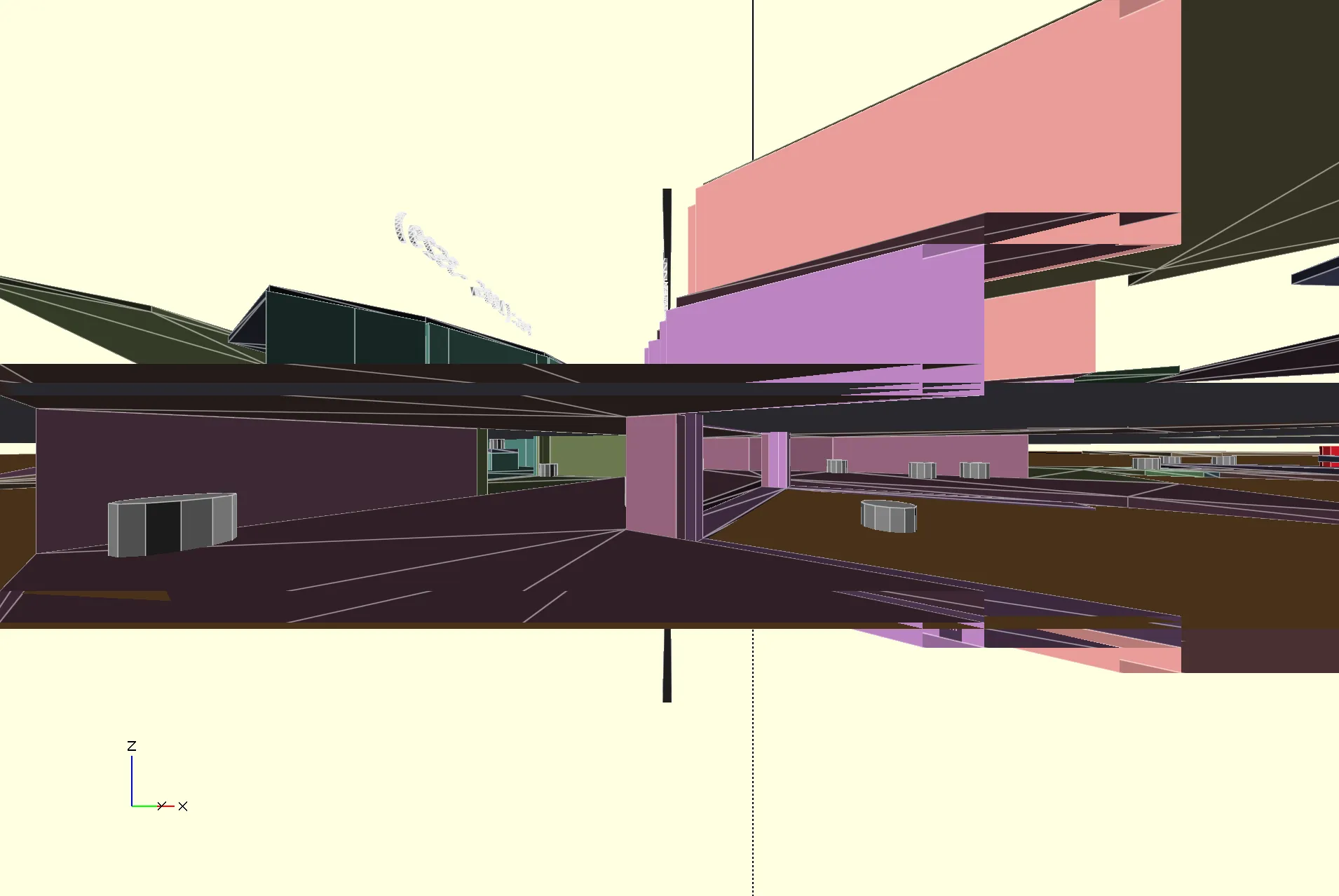
The Code
The Python side generates OpenSCAD code like this:
// Wall module - cubes positioned and rotated
module wall(x1, y1, x2, y2, floor_z, ceil_z, c) {
    dx = x2 - x1;
    dy = y2 - y1;
    length = sqrt(dx*dx + dy*dy);
    angle = atan2(dy, dx);
    height = ceil_z - floor_z;

    color(c)
    translate([x1, y1, floor_z])
    rotate([0, 0, angle])
    cube([length, 3, height]);
}

// Camera follows player
$vpt = [52.80, -170.32, 2.80];  // Look-at point
$vpr = [90, 0, -12.1];          // Rotation
$vpd = 50;                       // Distance
$vpf = 110;                      // FOV
Each frame, I regenerate the visible_walls() module with only the geometry in the player’s field of view.
Why?
Because “can it run DOOM?” is the ultimate benchmark for any system with a display output. But also because you can’t fake real-time rendering. Either you understand the tool deeply enough to push geometry at playable framerates, or you don’t. There’s no way to bullshit your way to 10 FPS.
Every one of these projects forced me to learn something I couldn’t have learned any other way. KiDoom taught me KiCad’s internals. This one taught me OpenSCAD’s rendering pipeline. And there’s something deeply satisfying about watching a CAD program designed for 3D printing render a 1993 shooter.
OpenSCAD was never meant for this. But with the right hacks, it works surprisingly well.
Try It Yourself
Browser Version (Recommended)
Play it now at doom.mikeayles.com - no installation required.
The web version runs at 60 FPS and includes full gameplay: movement, doors, enemies, weapons, and sound effects. Watch the OpenSCAD code update in real-time as you play.
Desktop Version
The code is on GitHub: openSCAD-DOOM
Requirements:
- Python 3.10+
- pygame
- OpenSCAD 2025+ (with Manifold enabled)
- DOOM1.WAD (shareware works)
# Run the engine
python3 game/game_engine.py

# Open game/game.scad in OpenSCAD
# Enable: Window → Animate (60 FPS, 1000 steps)
# Enable: Design → Automatic Reload and Preview
OpenSCAD DOOM Web - Technical Deep Dive
The browser version deserves its own explanation, because instead of just porting the renderer to JavaScript (boring), I kept the OpenSCAD pipeline intact.
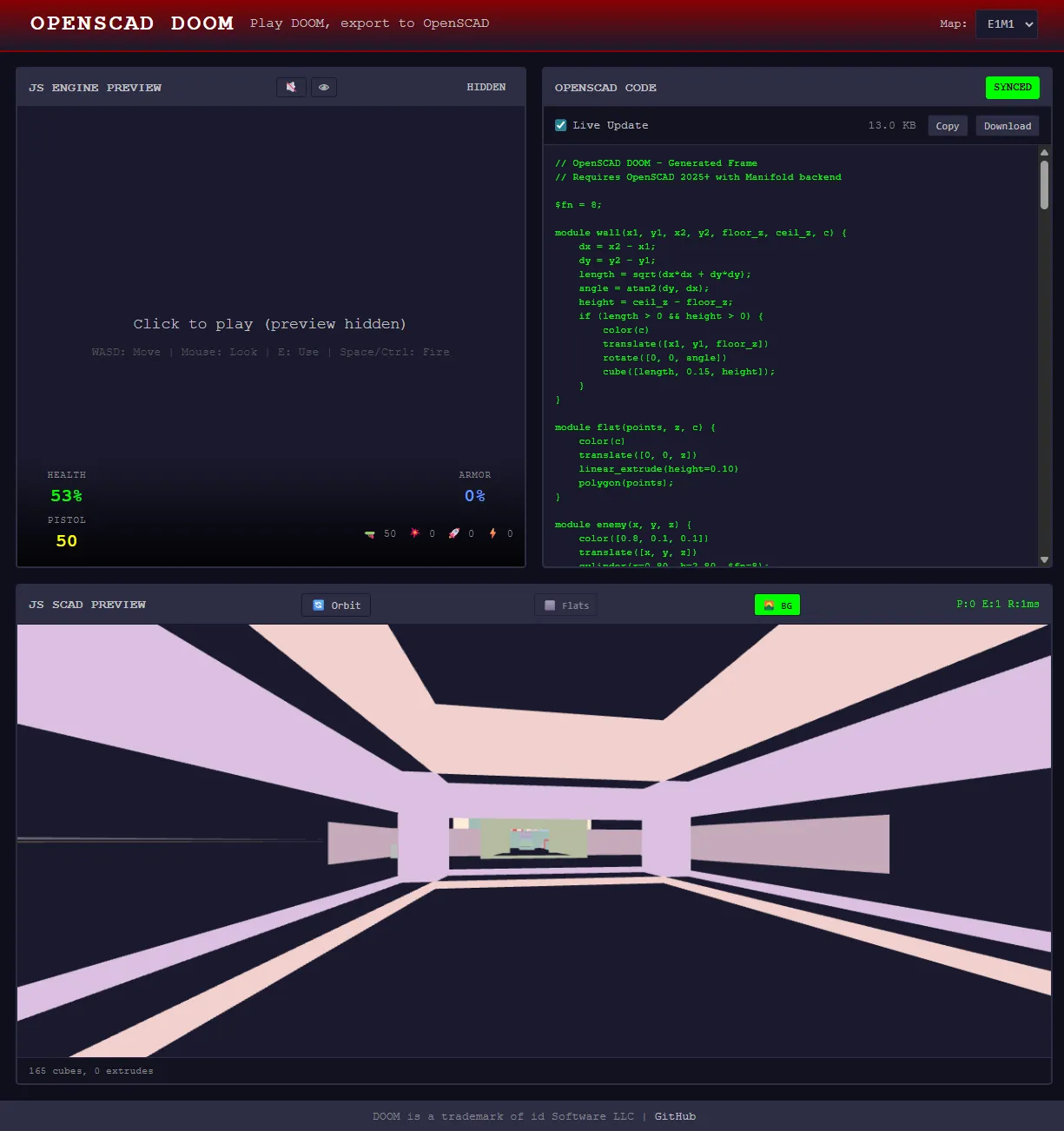
Architecture
Game Engine → SCAD Generator → Custom Parser → Three.js Renderer
     ↓              ↓               ↓                ↓
  Player       "cube([...])"     AST         Mesh pooling
  Enemies      "cylinder(...)"   Transforms   Material cache
  Doors        "$vpt=[...]"      Primitives   60 FPS
The game generates real OpenSCAD code. That code gets parsed by a custom TypeScript parser, evaluated into geometry primitives, and rendered via Three.js. The 3D view you see isn’t rendered directly - it’s parsed from SCAD code.
The Custom Parser
I built a subset OpenSCAD parser in TypeScript that handles:
- Primitives:
cube(),cylinder(),polygon() - Transforms:
translate(),rotate(),color(),linear_extrude() - Modules:
module name() { ... }definitions and calls - Viewport:
$vpt,$vpr,$vpd,$vpfcamera variables
The parser is intentionally limited - no CSG boolean operations, no sphere(), no for loops. This constraint keeps it fast enough for real-time rendering at 60 FPS.
Features
- Full DOOM Gameplay: Walk around E1M1, open doors, shoot enemies, pick up items
- Live SCAD Generation: Watch the OpenSCAD code update as you move
- Combat System: Health, armor, weapons, ammo, enemy AI
- Sound Effects: Weapon sounds, door sounds, enemy alerts
- HUD Overlay: Health, armor, ammo display
Controls
| Key | Action |
|---|---|
| W / ↑ | Move forward |
| S / ↓ | Move backward |
| A | Strafe left |
| D | Strafe right |
| ← → | Turn |
| Mouse | Look around (when captured) |
| E | Use / Open doors |
| Space / Ctrl | Fire weapon |
| 1-7 | Switch weapons |
Click the game area to capture the mouse. Press ESC to release.
Tech Stack
- React + TypeScript
- Vite
- Three.js
- Zustand
Source: openSCAD-DOOM-web
Yes, it can run DOOM. In a browser. Through a CAD language. At 60 FPS.