KiDoom: Running DOOM on PCB Traces
Running DOOM on PCB traces - vector-based rendering of the classic 1993 shooter using KiCad's PCB editor at 10-25 FPS

A technical deep-dive into rendering the classic 1993 shooter using real copper traces and component footprints
Why Did I Make This?
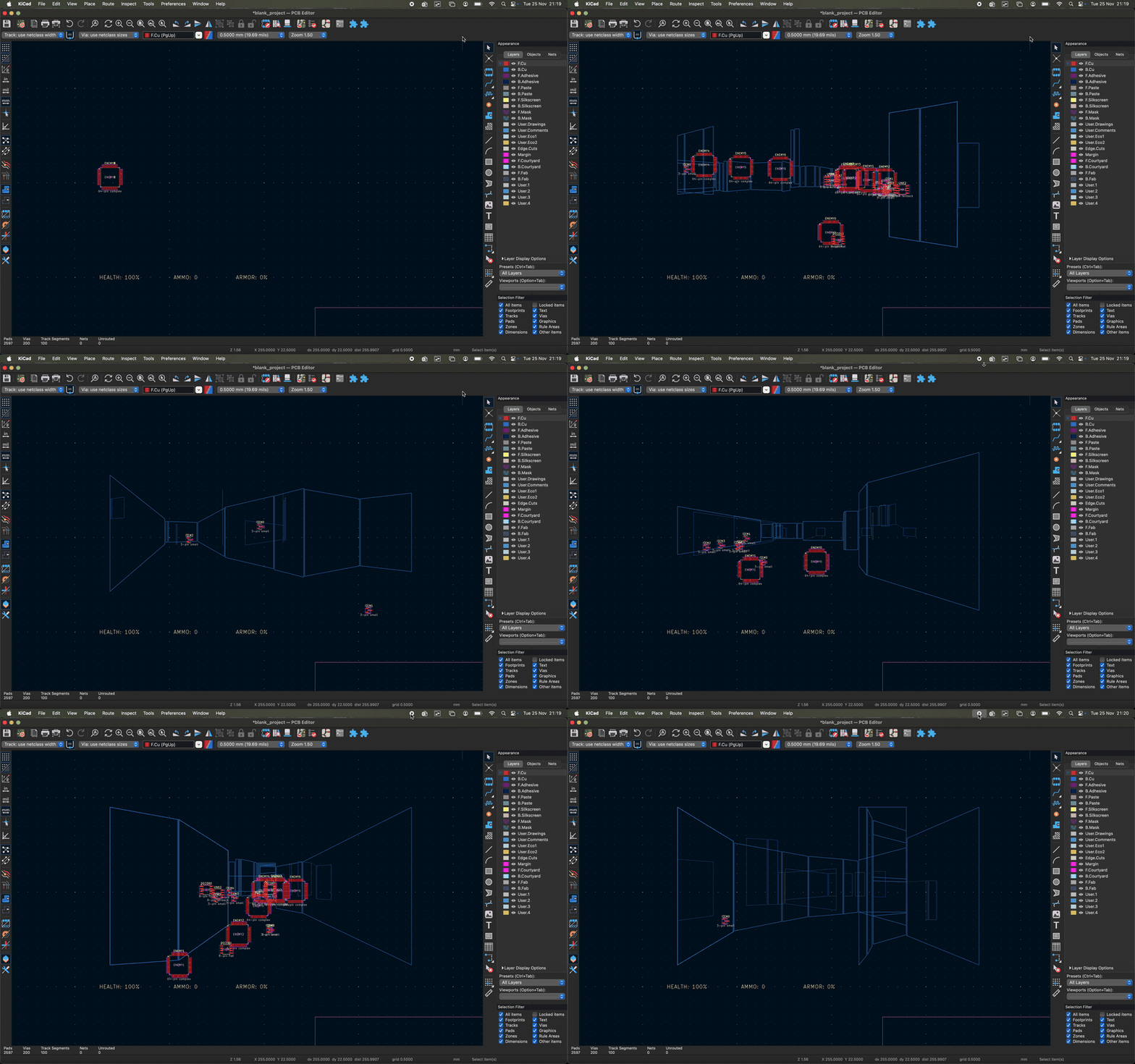
What if DOOM’s walls were actual PCB traces? What if enemies were QFP-64 chips and health packs were SOT-23 transistors? KiDoom answers these questions nobody asked, bringing the iconic first-person shooter to KiCad’s PCB editor using authentic electrical components as the rendering medium.
The result: a fully playable (10-25 FPS) technical demonstration where component complexity directly reflects gameplay significance. Demons are intimidating 64-pin packages. Ammo clips are humble 3-pin parts. And every frame creates a legitimate PCB design that could theoretically be fabricated.
What It Is, What It Isn’t
What It IS
- A real DOOM port - Uses the actual DOOM engine via doomgeneric, playing real levels with real game logic
- Authentic PCB rendering - Real
PCB_TRACKcopper traces, realFOOTPRINTcomponents from KiCad’s standard libraries, realPCB_VIAdrilled holes - A triple-mode system - SDL window for gameplay, Python wireframe for reference, KiCad PCB for the technical demonstration
- A vector renderer - Extracts geometry directly from DOOM’s internal
drawsegs[]andvissprites[]arrays (200-500x faster than pixel scanning) - An entity type system - Custom DOOM patches extract real MT_* entity types, categorized into 150+ footprint mappings
- Electrically valid - All components connected to a shared net; the PCB could be sent to a fab house (it just wouldn’t do anything useful)
- A technical demonstration - Proof that PCB editors are Turing-complete if you’re creative enough
- Playable - 10-25 FPS depending on hardware, enough for casual gameplay
What It ISN’T
- DOOM running IN KiCad - Let’s be clear: KiCad is only the display renderer. The actual DOOM engine runs as a separate C process, sending vectors over a socket. If I wanted DOOM truly running inside KiCad, I should have written it in KiCAD’s Python scripting engine. But that ship has sailed and I’m not rewriting it.
- A pixel-perfect recreation - This is wireframe/vector rendering, not texture-mapped graphics
- Smooth 60 FPS gaming - KiCad’s PCB refresh is the bottleneck; this is a tech demo, not a competitive gaming platform
- A practical use of your PCB editor - This serves no purpose other than being delightfully absurd
- A simple project - Required patching DOOM’s source, understanding KiCad’s Python API, solving macOS threading issues, and implementing multiple coordinate systems
- The first DOOM-on-everything project - But it might be the first using real PCB components as display elements
The Numbers That Made It Possible
The original concept was to render DOOM pixel-by-pixel using PCB pads:
320 x 200 = 64,000 pixels per frame
64,000 pads x 0.1ms per pad = 6.4 seconds per frame
= 0.15 FPS
Verdict: Completely unworkable.
The breakthrough: DOOM’s engine already calculates visible geometry as vectors. PCB traces ARE vectors. Instead of 64,000 pixels, I need 100-300 line segments:
~200 traces x 0.1ms per trace = 20ms per frame
+ Refresh overhead = 40-60ms total
= 10-25 FPS
Verdict: Actually feasible.
The Architecture
Triple-Mode Rendering
KiDoom runs three parallel visualizations:
                 DOOM Engine (C)
                       |
                 Vector Extraction
                       |
            +---------+---------+
            |         |         |
       SDL Window  Python    KiCad
       (Gameplay)  Renderer   PCB
(Debug) (Demo)-
SDL Window - Full DOOM graphics at the top-left of your screen. This is where you actually play.
-
Python Wireframe - A pygame window showing the extracted vectors. Green wall outlines, yellow entity boxes. Essential for debugging.
-
KiCad PCB - The main attraction. Blue copper traces form wireframe walls. Real footprints mark entity positions. Centered on an A4 landscape page.
The DOOM-to-PCB Pipeline
Every frame follows this path:
1. DOOM renders internally
   (BSP traversal, sprite projection, the whole 1993 magic)
        |
        v
2. Vector extraction captures drawsegs[] and vissprites[]
   (Screen-space coordinates, already perspective-projected)
        |
        v
3. JSON serialization over Unix socket
   {"walls": [[x1,y1_top,y1_bottom,x2,y2_top,y2_bottom,distance], ...],
    "entities": [{"x":160,"y_top":50,"y_bottom":100,"type":2}, ...]}
        |
        v
4. Python receives and parses
   (Main thread, because wx objects aren't thread-safe on macOS)
        |
        v
5. PCB elements updated in-place
   (Object pooling - no create/destroy, just SetPosition() calls)
        |
        v
6. pcbnew.Refresh()
   (The slow part - 30-50ms per frame)
The Entity Innovation
The most satisfying part of the project: entities render as real PCB footprints, with package complexity matching gameplay significance.
The Mapping System
| Gameplay Role | Footprint | Pin Count | Examples |
|---|---|---|---|
| Collectibles | SOT-23 | 3 pins | Health packs, ammo clips, keycards |
| Decorations | SOIC-8 | 8 pins | Barrels, dead bodies, torches |
| Enemies | QFP-64 | 64 pins | Zombies, demons, the player |
A Shotgun Guy is a 64-pin quad flat package. A medikit is a 3-pin transistor. This creates an instant visual hierarchy that any PCB designer would intuitively understand.
The Technical Challenge
DOOM’s vissprite_t structure doesn’t include a direct pointer to the entity. The entity type IS available during sprite creation in R_ProjectSprite(), but it wasn’t being captured.
The fix: Patch DOOM’s source:
// r_defs.h - Add field to vissprite_t
typedef struct vissprite_s {
    // ... existing fields ...
    lighttable_t* colormap;
    int mobjtype;     // NEW: MT_PLAYER, MT_SHOTGUY, etc.
    int mobjflags;
} vissprite_t;

// r_things.c - Capture during R_ProjectSprite()
vis->mobjtype = thing->type;  // Now I know what this sprite IS
The Python side maps 150+ entity types to three categories. The footprint pool pre-loads all packages at startup, so runtime is just position updates.
The Challenges I Solved
Challenge 1: Socket Timing
Problem: DOOM launches faster than Python can create the socket.
Wrong order:
1. Launch DOOM
2. DOOM tries to connect -> "Connection refused"
3. Create socket -> Too late!
Solution: Two-phase socket setup:
bridge.setup_socket()        # Create /tmp/kicad_doom.sock FIRST
doom_process = Popen(...)    # DOOM can now connect immediately
bridge.accept_connection()   # Wait for DOOM's connection
Challenge 2: Thread Safety on macOS
Problem: KiCad crashes when modifying PCB objects from background threads.
# CRASHES on macOS:
def monitor_thread():
    if doom_exited:
        renderer.cleanup()  # wx.Timer from background thread = crash
Solution: Only clean up thread-safe objects (processes, sockets) from the monitor thread. Let KiCad’s normal shutdown handle wx objects.
Challenge 3: Coordinate System Confusion
Problem: Initial rendering appeared upside-down.
Root cause: Incorrect assumption about KiCad’s Y-axis. Both DOOM and KiCad’s screen display have Y increasing downward. No flip needed!
# WRONG (caused vertical flip):
y_flipped = -y_centered

# RIGHT (both systems agree):
kicad_y = int(y_centered * SCALE)
Challenge 4: Wall Perspective
Problem: Walls compressed to the top half of the screen instead of extending to the bottom.
Root cause: Using absolute world heights instead of heights relative to the player’s viewpoint.
// WRONG:
screen_y = centeryfrac - FixedMul(world_height, scale)

// RIGHT:
screen_y = centeryfrac - FixedMul(world_height - viewz, scale)
Challenge 5: Portal Walls
Problem: Green wall polygons filled gaps where you should see through.
Root cause: DOOM’s BSP creates portal walls (silhouette=0) for openings. I was rendering them as solid.
Solution: Filter by silhouette type:
if silhouette == 0:  # Portal/opening
    continue         # Don't render
Performance Reality Check
What You’ll Actually See
| Hardware | FPS | Experience |
|---|---|---|
| M1 MacBook Pro | 15-25 | Playable tech demo |
| i7 + RTX 3050 Ti | 18-28 | Smooth-ish |
| Older i5 + integrated | 8-15 | Slideshow, but works |
| Standalone renderer | 60+ | pygame is fast |
The bottleneck: KiCad’s pcbnew.Refresh() call. Everything else (DOOM, socket, Python) runs in single-digit milliseconds.
Required Optimizations
Without these KiCad settings, performance is 2-5x worse:
- View -> Show Grid: OFF
- View -> Ratsnest: OFF
- Preferences -> Graphics -> Antialiasing: Disabled or Fast
- Preferences -> Display Options -> Clearance outlines: OFF
The Visual Style
KiDoom’s aesthetic is closer to Battlezone or Elite than modern DOOM:
- Walls: Wireframe boxes (4 traces each), blue (B.Cu layer), thickness encodes distance
- Entities: Real footprints positioned at entity locations
- Depth cueing: Thick traces are close, thin traces are far
- Floor/ceiling: Full-screen gradients from horizon (not per-sector rendering)
Think “1982 vector arcade game meets 1993 FPS meets 2025 PCB editor.”
The Files That Matter
kicad_doom_plugin/
├── doom_plugin_action.py      # Main entry point (wx.Timer, process management)
├── pcb_renderer.py            # Wireframe rendering with object pools
├── entity_types.py            # 150+ MT_* -> footprint category mappings
├── doom_bridge.py             # Two-phase socket server
├── coordinate_transform.py    # DOOM pixels -> KiCad nanometers
└── object_pool.py             # Pre-allocated traces and footprints

doom/source/
├── doomgeneric_kicad_dual_v2.c  # Vector extraction from DOOM internals
├── doom_socket.c                # Unix socket client
└── build.sh                     # Automated build with patches
Why This Exists
Because DOOM runs on everything. Because PCB editors have Python scripting. Because the intersection of those two facts demanded to be explored.
Is it practical? No. Is it efficient? Barely. Is it the correct use of a professional PCB design tool? Absolutely not.
But it works. And there’s something deeply satisfying about watching a Cyberdemon represented as a 64-pin QFP package, rendered on real copper traces, inside a tool designed for designing circuit boards.
Try It Yourself
# Clone the repo
git clone https://github.com/your-username/kidoom
cd kidoom

# Build DOOM (applies patches automatically)
cd doom/source && ./build.sh && cd ../..

# Test standalone first
./run_standalone_renderer.py  # Terminal 1
./run_doom.sh dual -w 1 1     # Terminal 2

# Install KiCad plugin
ln -s $(pwd)/kicad_doom_plugin ~/.kicad/scripting/plugins/kidoom

# Run in KiCad
# Open PCBnew -> Tools -> External Plugins -> KiDoom
Spin-off Projects
KiDoom’s vector rendering approach has inspired additional experiments:
ScopeDoom - DOOM rendered on an oscilloscope in XY mode. Uses the same vector extraction pipeline from KiDoom, outputting audio signals that draw the game on an oscilloscope display. Some of the original ScopeDoom development code is still present in this repository under scopedoom/.
Inspiration & References
The wireframe approach was partly inspired by DOOM on a Vectrex - Sprite_tm’s incredible port that renders DOOM on a 1982 vector display. That project proved vector-based DOOM rendering was viable; KiDoom just substitutes copper traces for phosphor lines.
For understanding the fundamentals of how 3D rendering pipelines work (projection, depth sorting, the painter’s algorithm), Yuriy Georgiev’s polygon rendering tutorial provides an excellent foundation. Many of the same concepts apply when extracting geometry from DOOM’s internals.
Acknowledgments
- id Software for DOOM (1993)
- ozkl for the doomgeneric framework
- KiCad Project for the PCB editor and Python API
- Sprite_tm for proving vector DOOM was possible on the Vectrex
- The “DOOM runs on everything” community for the inspiration
Can it run DOOM? Yes. Even PCB editors.
Project Status: Fully working with triple-mode rendering and footprint-based entities
Documentation: See CLAUDE.md for technical implementation details and logs/docs/ for the development journey
License: See LICENSE file